
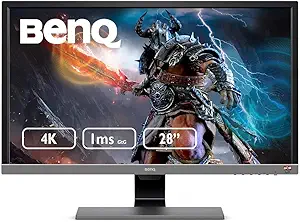
BenQ EL2870U 28 inch 4K Monitor for Gaming 1ms Response Time, FreeSync, HDR, eye-care, speakers
4.5
Rating
3.4K
Reviews
1
Videos
0
Price Points
Featured across 1 creator videos.
L2870U brings HDR together with Brightness Intelligence Plus Technology (B. I. + Tech. ) to gently soften bright areas while keeping dark details crystal clear. EL2870U's simple hotkey switches between 4 levels of HDR and B. I. + modes to balance maximum contrast and vibrancy and fully enjoy the splendid image performance of HDR while maintaining your viewing comfort. The image has a faulty coloration - Go to Picture and Reset Color, and then choose YES to reset the color settings to the factory
- High resolution 4K monitor: 28-inch LCD TN 3840x2160 resolution
- Eye Care comfort for extended sessions: Proprietary brightness Intelligence Adaptive technology adjusts brightness for comfortable viewing; low Blue light and zero flicker technology prevent headaches and eye strain. This eye Tech makes images easy On your eyes.
- Smooth game play: AMD Free Sync for smooth game play, eliminating tearing and broken frames; HDR technology offers greater brightness and contrast level for vivid images; 1 mms GTG; 60Hz; 10-bit displays 1. 07 billion colors
- Get connected: HDMI, DisplayPort input for multi-device connection. VESA wall mount
- Hear the action: built-in speakers x 2, Headphone jack
- Integrated cable management system: neatly hides cables inside monitor stand; VESA wall mount
- Connectivity Technology: Hdmi 2
L2870U brings HDR together with Brightness Intelligence Plus Technology (B. I. + Tech. ) to gently soften bright areas while keeping dark details crystal clear. EL2870U's simple hotkey switches between 4 levels of HDR and B. I. + modes to balance maximum contrast and vibrancy and fully enjoy the splendid image performance of HDR while maintaining your viewing comfort. The image has a faulty coloration - Go to Picture and Reset Color, and then choose YES to reset the color settings to the factory
Featured in 1 Video
This page contains affiliate links. Thothy may earn a commission at no extra cost to you if you purchase through these links.
Last updated: 5/29/2026, 6:38:38 PM